
Bytecode simulator
The Neosyn bytecode simulator runs your .cg source directly,
without an HDL compile step in between, producing cycle-accurate
output in milliseconds rather than minutes.
It powers:
- Fast Simulation (Bytecode) in the VS Code extension
(
neosyn.cg.simulate). cg-language-server.jar simulatefrom the command line.
Both are built on the same simulator backend and language semantics. Packaging and integration details differ, but equivalent tool versions should produce the same simulation behavior.
How it works
The language server compiles your C⏚ source to an intermediate
representation (IR), then lowers that IR to JVM bytecode -
literally .class files that implement each task as a Java method.
A small cycle scheduler runs those methods in topological order
each cycle, propagating port writes and observing port reads.
Because the simulator is just executing bytecode, small and medium-sized designs are typically fast enough for tight edit-run inspect loops. Actual throughput depends on the design, host machine, JVM, and whether waveform output is enabled.
Timing model
The simulator runs the same three-phase cycle schedule (execute, commit, propagate) as the language semantics; see Concepts → Execution is cycle-by-cycle. Port visibility rules - bare same-cycle, push/confirm next-cycle, stream with ready/valid - are documented in Declarations → Ports. The subsections below cover what is specific to the simulator.
Topological ordering
Inside a network, sub-instances execute in topological order (Kahn's algorithm at compile time). Producers run before consumers, so values propagate along the connection graph in a single phase without needing multiple passes. The exception is a feedback loop - a cycle in the connection graph - where execution still terminates but one of the edges effectively reads the previous cycle's value.
Common timing pitfalls
Push-port one-cycle latency. A push output written on cycle N is not visible until cycle N+1. If A writes a push port and B reads it in the same cycle, B sees the previous value (or invalid). This is by design - push ports model registered outputs. Use a bare port if you need same-cycle visibility.
Bare-port ordering dependency. Bare ports are combinational. B sees A's write only if A executes earlier in topological order. If B has no connection dependency on A, the order between them is undefined. Make the dependency explicit - connect the port.
Bus contention on a combinational mux. When a combinational
mux checks several push sources with if / else if, only the
highest-priority one fires per cycle. The lower-priority source's
data is silently dropped - there is no automatic backpressure.
Fix: the writer waits (via idle() or fence) for the slow
consumer to finish before issuing on the competing path.
fence vs idle. fence creates a cycle break and the
scheduler re-checks input conditions before resuming - use it when
the next step depends on an input arriving. idle(N) creates N
unconditional empty cycles and produces no outputs during them -
use it when you need to give another entity time to finish without
reading anything.
Unconditional fence creates unreachable states. A task that
checks a push port in state 0 then unconditionally fences to
state 1 misses the push signal whenever it arrives during
state 1 - push validity lasts exactly one cycle. Prefer a
single-state design that guards each port with .available() and
latches state in local variables:
// Wrong: unconditional fence creates blind spots
void loop() {
  if (signal.available()) { signal.read(); flag = true; }
  fence;  // stuck in state 1 when signal arrives
  data.read();
}

// Right: single-state, checks both every cycle
void loop() {
  if (signal.available()) { signal.read(); flag = true; }
  if (data.available())   { data.read(); /* use flag */ }
}Running a sim
From VS Code
- Open the
.cgfile containing your top-level test network. - Trigger Fast Sim through any of these surfaces - pick whichever
is closest to hand:
- Status bar - click the
▶ Fast Simbutton that appears in the bottom-right while a.cgfile is active. - Editor title bar - click the play icon at the top-right of the file tab.
- Right-click in the editor - pick Neosyn: Simulate → Fast Simulation (Bytecode).
- Command palette - run Neosyn: Fast Simulation (Bytecode).
- Status bar - click the
- The console pane shows
print()output cycle by cycle. A.vcdfile is dropped at the project root (next tosrc/).
From the command line
java -jar cg-language-server.jar simulate <file.cg>If the file declares multiple top-level entities and the simulator
can't guess which is the top, pass --entity:
java -jar cg-language-server.jar simulate <file.cg> \
--entity MyNetworkThe standalone JAR is built into
releng/lsp-server/target/cg-language-server.jar and bundled with
the VS Code extension under server/.
Short aliases: sim for simulate, gen for generate, ir for
generate-ir. Run with --help to see the full CLI, or see
CLI reference.
Test networks and monitors
The bytecode simulator runs a network, not a task directly. The canonical pattern is a thin test network that instantiates the design under test plus a monitor - an inner task that asserts what the DUT should produce.
network Counter_test {
  import com.example.Counter;

  properties {
    test: { terminate: "monitor.finished" }
  }

  dut = new Counter();

  monitor = new task {
    bool finished;

    void setup() {
      for (u4 expected = 0; expected < 8; expected++) {
        u4 got = dut.count.read();
        print("cycle ", expected, " count = ", got);
        assert(got == expected);
      }
      finished = true;
    }
  };
}The terminate expression (typically monitor.finished) ends the
simulation when it becomes true. The monitor's setup() runs once
at startup, then yields to loop() if defined. assert(expr)
fails the simulation on the first false, with a diagnostic at the
source line. Real designs often add observation ports (e.g.
out push u16 obs_addr; out u8 obs_data;) so the monitor can
read() events emitted by the DUT.
The test property
| Form | Use when |
|---|---|
test: { terminate: "monitor.finished" } | Run until a state variable / port goes true. Most common pattern. |
test: { port_a: [v0, v1, …], port_b: [v0, v1, …] } | Drive ports cycle-by-cycle with literal stimulus arrays. Run length = longest array. See Properties / Test. |
The two forms can coexist on the same network. If both are present,
the simulator drives the stimulus arrays and checks terminate
each cycle.
Print and assertions
print() outputs go to the VS Code output pane or stdout
(CLI). Arguments are concatenated. Integers print as
zero-padded hex with a 0x prefix (e.g. 0x5, 0x1e, 0xabcd);
booleans print as true / false; strings pass through verbatim.
There is no format-string DSL - if you need decimal, do the
conversion yourself in the .cg source. assert(expr) fails the
simulation on the first false, with the source location in the
diagnostic.
VCD output
Every simulation drops a VCD
file at the project root (next to src/ and verilog-gen/),
named after the top-level entity (e.g. Counter_test.vcd). It
captures every port (data and valid for push ports, plus ready
for stream ports) and every state variable.
Open it with Neosyn: Open Waveform Viewer in VS Code, the WaveTrace extension, GTKWave, or Surfer.
Trusted at scale
The simulator runs the Intel-8088 reference CPU's full regression suite as part of CI. The five-tier bottom-up test pyramid runs in seconds:
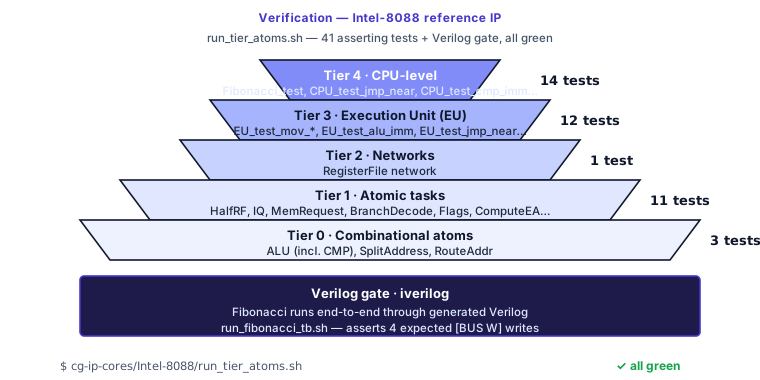
The same simulator that runs in CI runs in your editor. Passing tests there are passing tests everywhere.
Cross-check against HDL
The bytecode sim is the canonical correctness check; reach for a
Verilog-side cross-check only when you specifically need one
(suspected generator bug, external Verilog modules stubbed in
bytecode, or pre-tapeout toolchain confidence). The inline monitor
pattern with print() and assert() doesn't survive to
synthesizable Verilog - an HDL cross-check needs a hand-written
testbench that drives the DUT directly. See
Cross-check against HDL for the
honest procedure.
For the CLI invocation of simulate, generate, and related
commands, see CLI reference.
Limitations
- No floating-point - C⏚ has no floating-point types and the simulator inherits that.
- External tasks are stubbed - if your design instantiates an external task with a Verilog implementation, the bytecode sim sees only the empty signature. Fall back to an HDL simulator for full external-module behaviour.
- Compilation reuse depends on the client integration - the CLI and editor integrations may manage generated artifacts differently. If startup cost matters, measure it in the exact environment you use for CI or daily development.
Where to dig deeper
- Cross-check against HDL - run the same testbench through Icarus Verilog or GHDL.
- The Intel-8088 reference IP at
cg-ip-cores/Intel-8088is the largest design exercised by the bytecode sim today; itsrun_tier_atoms.shruns the full asserting test sweep. - Found a bug? Open one at Neosyn-Logic/cg-compiler.