
Install
Three surfaces, one compiler. Pick the one that matches how you work:
| Surface | For | Get it |
|---|---|---|
| VS Code extension | Writing C⏚ by hand. Editor, Fast Sim, FSM and Graph views. | Portal or Open VSX |
| Standalone JAR / CLI | CI, scripting, your own editor integration. | Ships inside the .vsix, or build from source |
| neosyn-fpga-mcp | Letting an AI agent write and verify C⏚. | pip install neosyn-fpga-mcp — see Agent kit |
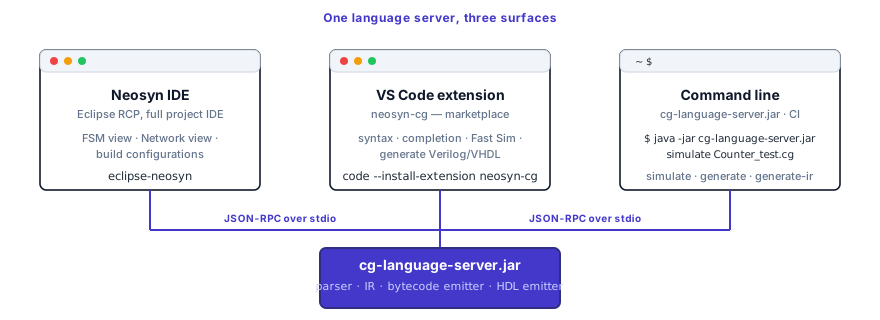
All three drive the same language-server jar and the same compiler pipeline. Packaging differs; the language and the generated HDL are identical for the same tool version.
Requirements
Java 17 or newer on your PATH. The compiler and simulator run on the
JVM. The extension bundles the language-server jar, but it does not
bundle a Java runtime — you supply that.
java -versionIf that fails, or prints 11 or older, install
Eclipse Temurin 17
(free, Windows/macOS/Linux) and reopen your editor. You can also point the
extension at a specific runtime with the
neosyn.cg.languageServer.javaPath setting instead of changing your
PATH.
Then, per surface:
- VS Code extension — VS Code 1.85 or later. 8 GB RAM, 2 GB disk.
- Standalone JAR / CLI — nothing beyond Java.
- neosyn-fpga-mcp — Python 3.10+, plus a compiler jar.
What the license unlocks
Worth understanding before you install, because it determines what happens on first run.
| Free, no license | Syntax highlighting, snippets, file icons. These are client-side and always work. |
| Open source (MPL-2.0) | The C⏚ frontend, the Verilog generator, the language server, the runtime library. Build cg-compiler yourself and compile to Verilog forever, with no license gate. |
| Licensed | The prebuilt supported extension, the bytecode Fast Sim, the VHDL backend, the FSM and Graph views, and the production IP cores. |
The extension verifies the license before it starts the language server. Without a valid license or an active trial the server does not start at all — no diagnostics, no hover, no navigation, no generation, no simulation. That is not a degraded mode, it is off. A 14-day trial takes three fields and no credit card.
You never pay for permission to compile. The Verilog path is open source and stays that way — see the open-core promise.
Licensing is the full story: activating in VS Code or on CI, and what every license error means.
Project layout
The compiler expects package names, file names, and folder paths to agree:
- A file declaring
package com.example;should live under<src-root>/com/example/. - The file base name should match the top-level entity it defines.
Example:
task Counternormally lives inCounter.cg. - Imports use the fully-qualified entity name, such as
import com.example.Counter;.
Minimal example:
my-project/
  src/
    com/
      example/
        Counter.cg
Counter_test.cgIf you skip this layout, imports and top-level entity discovery may fail even when the code itself is valid.
See Project layout for the stricter rules, recommended repository shape, and common failure modes.
VS Code extension
1. Install the extension
The fastest route is your editor's own marketplace — no account needed to install, and updates arrive automatically.
VS Code — search Neosyn C⏚ in the Extensions view, or:
code --install-extension neosyn.neosyn-cgVSCodium, Cursor, Windsurf — these read Open VSX, where the same build is published. Search Neosyn C⏚ in the Extensions view, or:
ovsx get neosyn.neosyn-cgFrom the portal — if you would rather install a pinned version, or you are
offline or behind a proxy that blocks the marketplaces, log in to the
downloads portal, download the
neosyn-cg-X.Y.Z.vsix, and install it:
code --install-extension neosyn-cg-2.10.0.vsixOr in VS Code: Extensions view → … menu → Install from VSIX… → pick the
file, then reload the window.
All three give you the identical build, and the same license file works with any of them.
2. Bind your license to this machine
The license is machine-bound, so the toolchain needs your machine's fingerprint before it can issue one.
- Open the command palette (
Ctrl/⌘+Shift+P) and run Neosyn: Show Machine Fingerprint. The 64-character hash is copied to your clipboard. - Paste it into the portal and download your license file.
- Run Neosyn: Install License File… and select it. It is stored at
~/.neosyn/cg.license, and VS Code offers to reload.
Neosyn: Open License Portal jumps straight to step 2 from inside the editor.
The CLI reads the same ~/.neosyn/cg.license, so doing this once covers
both surfaces. On a machine with no editor — a CI runner, a build box —
use java -jar cg-language-server.jar fingerprint and the
NEOSYN_CG_LICENSE variable instead. See
Licensing → Activate for the CLI or CI.
3. Verify
Open any .cg file — the Quick tutorial has one you can
paste. You should see live diagnostics and a
Neosyn: Fast Simulation (Bytecode) play icon in the editor title bar.
Run it: if the simulator prints to the Output → Neosyn C⏚ channel, the
install is good.
If the server will not start
You get a modal with three buttons — Install License File…, Show My Fingerprint, Open Customer Portal — and a reason:
| Message | Cause | Fix |
|---|---|---|
Could not run Java | No Java 17+ on PATH | Install Temurin 17, or set neosyn.cg.languageServer.javaPath |
FILE_MISSING | No license installed yet | Run Neosyn: Install License File… |
FINGERPRINT_MISMATCH | License belongs to another machine | Rebinding is a support operation — contact us |
EXPIRED | Trial or subscription lapsed | Pricing, or the billing portal on your account page |
Those are the common ones. All eight license reasons, including
BAD_SIGNATURE and UNSUPPORTED_VERSION, are decoded in
Licensing → When it fails. Other
startup problems are in Troubleshooting.
Standalone CLI
The language-server jar runs as a long-lived LSP server (for editor integrations) and as a one-shot CLI (for scripting and CI). The CLI is the most direct way to drive the compiler and the best reference surface when you need explicit flags and reproducible commands.
See CLI reference for the command-oriented version of this section.
Get the jar
The full cg-language-server.jar ships inside the extension .vsix (from
the portal). Grab it from an installed
extension:
ls ~/.vscode/extensions/neosyn.neosyn-cg-*/server/cg-language-server.jarIt is the same license-gated jar the editor uses, and it reads the same
~/.neosyn/cg.license.
Prefer the open-source build? The Verilog-only, MPL-2.0 compiler lives at github.com/Neosyn-Logic/cg-compiler — no VHDL, no bytecode Fast Sim, and no license gate. Build it from that repo, or download a prebuilt jar from its releases page.
Sanity check
java -jar cg-language-server.jar --versionThis should print a version string. If you get
UnsupportedClassVersionError, your java is too old — run
java -version and upgrade to 17 LTS or newer.
CLI surface
| Command | Alias | Purpose |
|---|---|---|
simulate | sim | Run the bytecode simulator on a .cg file |
generate | gen | Emit synthesizable Verilog or VHDL |
generate-ir | ir | Dump the internal IR (XMI) for inspection |
Common flags: --entity <name> selects the top-level entity when there is
more than one in scope. --target verilog|vhdl switches the HDL backend
(default Verilog). --output <dir> overrides the output directory.
--help and --version work everywhere.
Defaults worth knowing:
simulatewrites a VCD by default.simulatestops at the tool's default cycle cap unless the test terminates earlier.generatewrites toverilog-gen/orvhdl-gen/unless--outputis supplied.
A typical end-to-end invocation:
java -jar cg-language-server.jar simulate Counter_test.cg
java -jar cg-language-server.jar generate Counter.cg --target verilogThe first runs the cycle-accurate sim and, by default, writes a VCD at the
project root (named after the top-level entity). The second emits Verilog
under verilog-gen/ at the project root, preserving the source's package
path.
neosyn-fpga-mcp (MCP)
If you want an AI agent to write C⏚ and check its own work, install the MCP server instead of — or alongside — the extension:
pip install neosyn-fpga-mcp
export CG_JAR=/path/to/cg-language-server.jarIt works against the open-source jar, so no license is required. Full setup, client configuration and the tool list are in Agent kit.
Next
Walk through the Quick tutorial to write your first counter, simulate it, and generate Verilog. About ten minutes end to end.